Parthasarathy Ramaraj

Engineering leader by day. I build my own software the rest of the time.

This page is about what I make on my own: a platform for running a company's AI agents safely, with a console that installs and monitors it, an iPhone app for receipts, a tool for reviewing how companies govern AI, and a free daily stock-screen newsletter. Each one is designed, written and run by me.

My work history is on LinkedIn and in my resume. Most people call me Partha. I'm based in New Jersey, and I'm open to conversations.

What I'm building

Projects I design, write and run myself, outside my day job.

AgentFloor

One governed place for a company's AI agents: build them, share them, run them, and see what each one costs.

Private build, release 0.1.3, runs on Google Cloud

People sign in with company SSO and write skills: reusable, versioned instructions with typed inputs and outputs. They wire skills into workflows on a visual canvas and start them by hand, on a schedule, from a signed webhook or from a GitHub pull request event. Every run shows its steps, its tokens and its cost.

The rules are enforced in code, not in prompts. Permission checks run inside the tool call and fail closed. Credentials belong to whoever started the run, never to whoever wrote the skill. Every model call goes into a cost ledger, tagged with the user, run, loop iteration and skill that caused it.

The starter workflow, on every new pull request

  1. Load the pull requestA GitHub App event, an API call or a schedule starts the run.
  2. Security reviewA skill scores the change and lists its findings.
  3. Code reviewA second skill reads the same changes and scores them too.
  4. Either score below 70?If so, alert the team in Slack. If not, skip it.
  5. Post a summary on the pull requestResults and the total cost stay on the run, even if delivery fails.

The code is private. A walkthrough is available on request: email me.

  • Visual workflow canvas. Skill steps, connector actions, Yes/No and score branches, and an "If it fails" fallback on any step. Test runs use pretend data and never really send anything, and finished runs play back step by step on a timeline.
  • Runs survive crashes. Each step saves its result and the run's checkpoint in one transaction, so any worker can pick up any run. Calls that change things carry idempotency keys. If it's unclear whether one went through, a person decides; it is never retried silently.
  • Budgets checked before the call. Spend is reserved up front with one conditional database update, then settled. Costs are counted once, deduplicated on the provider's request id.
  • Schedules written in words, picked from a menu or typed as cron, with time zones, daylight-saving rules, a weekly budget forecast and three separate guards against firing twice. Personal schedules run on the owner's access; company schedules need a manager's approval.
  • Signed webhooks with timestamp, nonce, size and rate checks, a dead-letter list, and secret rotation with a 24-hour overlap.
  • Connectors: a GitHub App set up in two clicks, Slack, email, Google Drive (results trimmed to what the person running it may open) and any outside API, with every key held in Google Secret Manager.
  • A publish gate. Sharing a skill across the company needs a schema check, declared permissions, the org's policy checklist and a passing test with writes mocked.
  • Improve with AI turns rough notes into a draft skill, treated as untrusted input until someone reviews it.
  • TypeScript end to end: Fastify, React, Drizzle on Postgres (or embedded PGlite), Claude or OpenRouter models, tested with Vitest and Playwright. It ships as one container on Cloud Run with Cloud SQL.

AgentFloor Tenant Admin

The operator console that installs AgentFloor in a customer's own Google Cloud project, sets it up, and watches it around the clock.

Private build, the companion to AgentFloor

An install is a Terraform plan you review before applying: Cloud Run, Cloud SQL, Secret Manager and a service account, all inside the customer's project. An eight-step wizard then covers sign-in, models, budgets, guardrails, sandbox, notifications and a final drill, aiming for setup in 30 minutes. Every change is a dry run with a diff first, then applied only if nobody else changed it in the meantime.

The console talks to each tenant through one versioned contract and a token that can configure the tenant and nothing more. Guardrails stop most problems. This console is for the ones they miss, and it treats silence as a fault, not as proof that all is well.

The code is private. A walkthrough is available on request: email me.

  • 38 detection rules shipped, from blocked-network spikes and prompt-injection attempts to secrets in output, runaway agent loops and unusual spending. Each rule is tagged to 10 agentic-AI security risks and 10 sandbox properties, and CI fails if coverage drops.
  • Behavioural baselines for each agent: which tools it uses, how fast it spends, when it runs and where it connects. New agents borrow the tenant's or the fleet's baseline for their first week.
  • Incidents, not alert storms. Related alerts group by tenant, cause and agent. Reversible responses, such as throttling an agent, run automatically and can be undone; destructive ones wait for an operator.
  • A dead-man switch. If the telemetry feed goes quiet for 60 seconds someone gets paged, and the page clears when the feed returns.
  • Flood defence. Event caps per run, agent and tenant, with a priority lane so real alerts still get through. The flood itself becomes an incident.
  • Logs you can trust: redaction on the way in, people pseudonymised with a per-tenant salt, planted canaries to prove the redactor works, and hash-chained export copies.
  • OpenTelemetry both ways. Tenants send traces and logs in, and the console's own actions go out as spans. A CI check plants every secret it holds and fails if any of them reaches an exported span.
  • Same stack as AgentFloor (TypeScript, Fastify, React, Drizzle on Postgres), plus Terraform for installs and upgrades.

Receiptly.ai

Scan receipts. Find anything.

Public beta on TestFlight, iPhone only

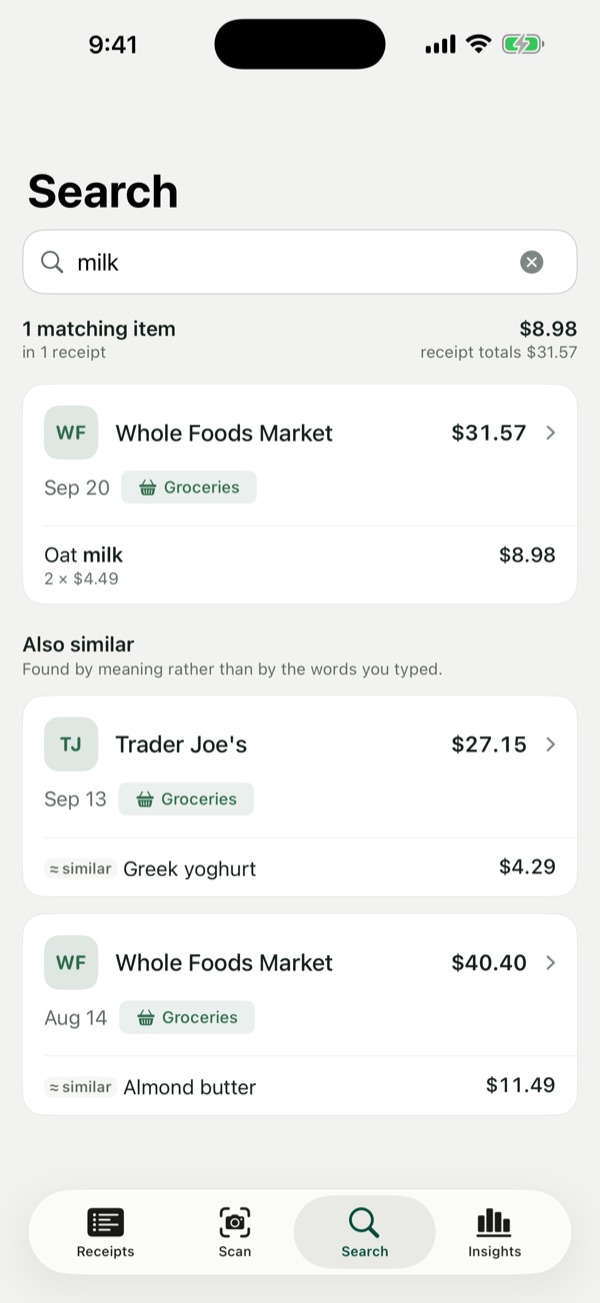
Photograph a receipt and Receiptly reads the shop, the date, the total and every line item, right on your iPhone, in a couple of seconds. Later you search for the thing you bought, not just the shop: type "milk" and you get the line off the receipt with the price you paid.

Version 1.0 has no account and no server. Receipts are read and stored on the phone, in an encrypted database kept out of iCloud backups. There's no analytics, no crash reporting and no tracking, so there's nowhere for your data to go.

  • Native iPhone app in Swift and SwiftUI. Apple's Vision framework reads the text, and on newer iPhones Apple's on-device model helps make sense of it.
  • Honest about uncertainty. Every field gets a confidence score, an arithmetic check flags receipts that don't add up, and a field it can't read stays empty rather than guessed.
  • Tested before every release against 220 sample receipts, with minimum accuracy thresholds for fields and for line items.
  • Search by meaning as well as by shop, date, amount or the item code printed on the receipt.

Join the beta on TestFlight

Install Apple's TestFlight app first, then open the link on your iPhone. Feedback on what worked and what broke is very welcome.

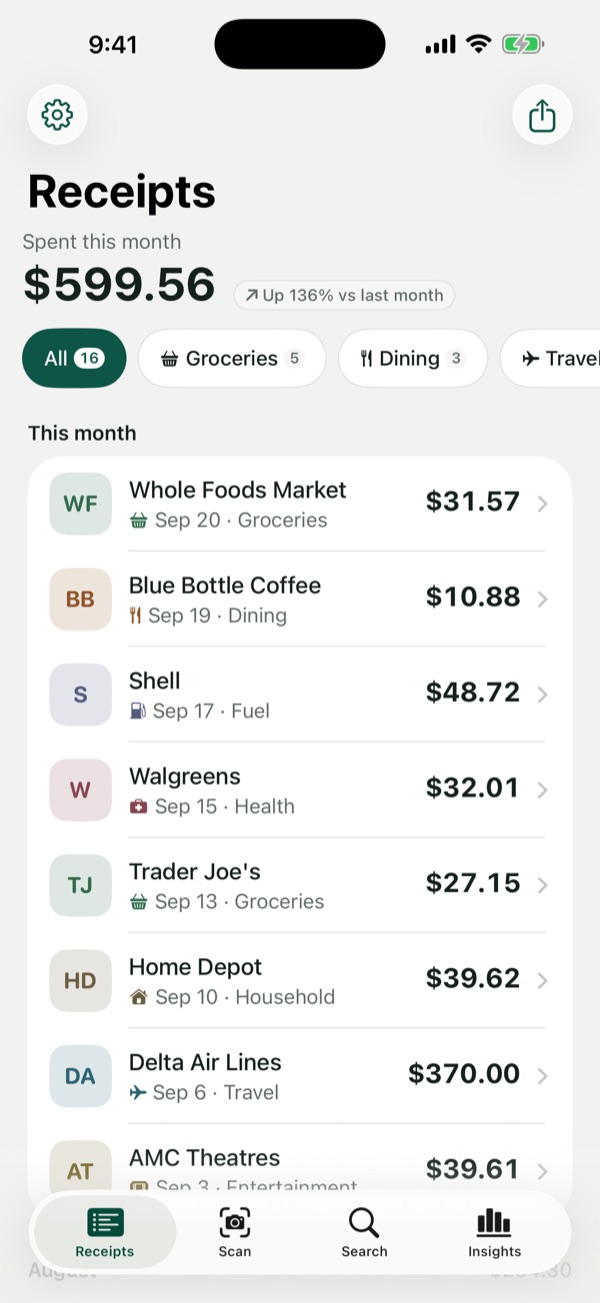
Receiptly's receipt list, showing this month's total and receipts grouped by category
Your receipts
Searching for milk returns the matching line item and its price
Search by item
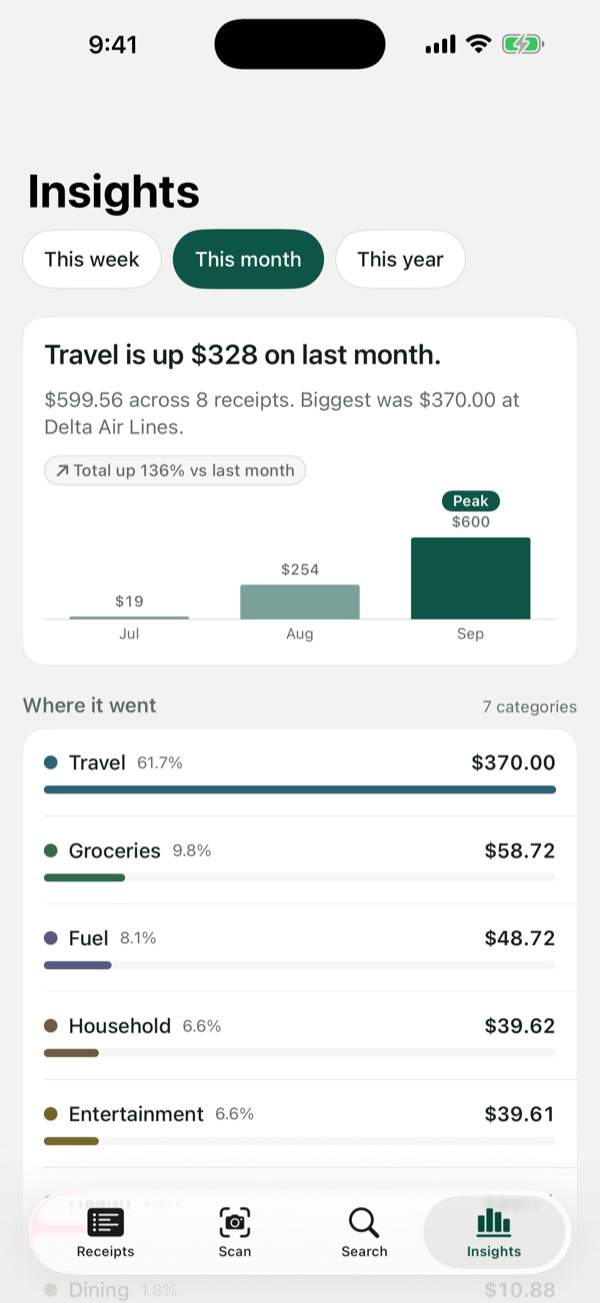
Spending insights by month and by category
Where it went

AI Maturity Assessment

AI governance reviews, mapped to the NIST AI RMF, ISO/IEC 42001 and the EU AI Act.

An assessor picks an AI vendor or an AI product, works through a guided questionnaire, and gets a maturity report scored across eight governance domains, with the gaps and a remediation plan. An agent runs the session: it chooses the next question, can draft answers from uploaded evidence, scores each response and writes the executive summary.

A walkthrough is available on request: email me.

Try the demo. Sign in at the AI Maturity demo with the read-only viewer account.

Email: viewer@aimaturity.local

Password: email me and I'll send it.

The viewer can browse assessments and reports but can't change anything.

  • Two kinds of review. A 38-question vendor assessment, and a product assessment that grows from 17 to 71 questions with the product's risk tier.
  • Answers drafted from evidence. Upload up to 30 documents and the model drafts an answer for every applicable question, for the assessor to check.
  • Runs on a local open model (Qwen 2.5 through Ollama), or Claude when configured, with streaming and retries.
  • Built for review and audit: admin, assessor, auditor and viewer roles, short-lived sign-in tokens, rate limits and an audit log.
  • Next.js and SQLite in Docker behind Caddy with HTTPS on AWS, tested with Vitest and Playwright.

Stock Screener

Four stock screens in your inbox before the market opens. Free, and anyone can join.

Every weekday from 7:00 Eastern, four pipelines scan the S&P 1500 and email what they find. Each screen is a fixed set of steps that runs the same way every morning, and the rules are published so readers can judge the output for themselves.

  • Daily digest. Today's earnings reporters, scored 0 to 100 on news and social chatter plus revenue and EPS growth, with a short AI-written thesis for the top names.
  • Unusual volume. Small and mid caps trading at 1.5 times their usual volume or more, and closing up.
  • Accelerating revenue. Companies whose quarter-over-quarter revenue growth has risen four quarters in a row.
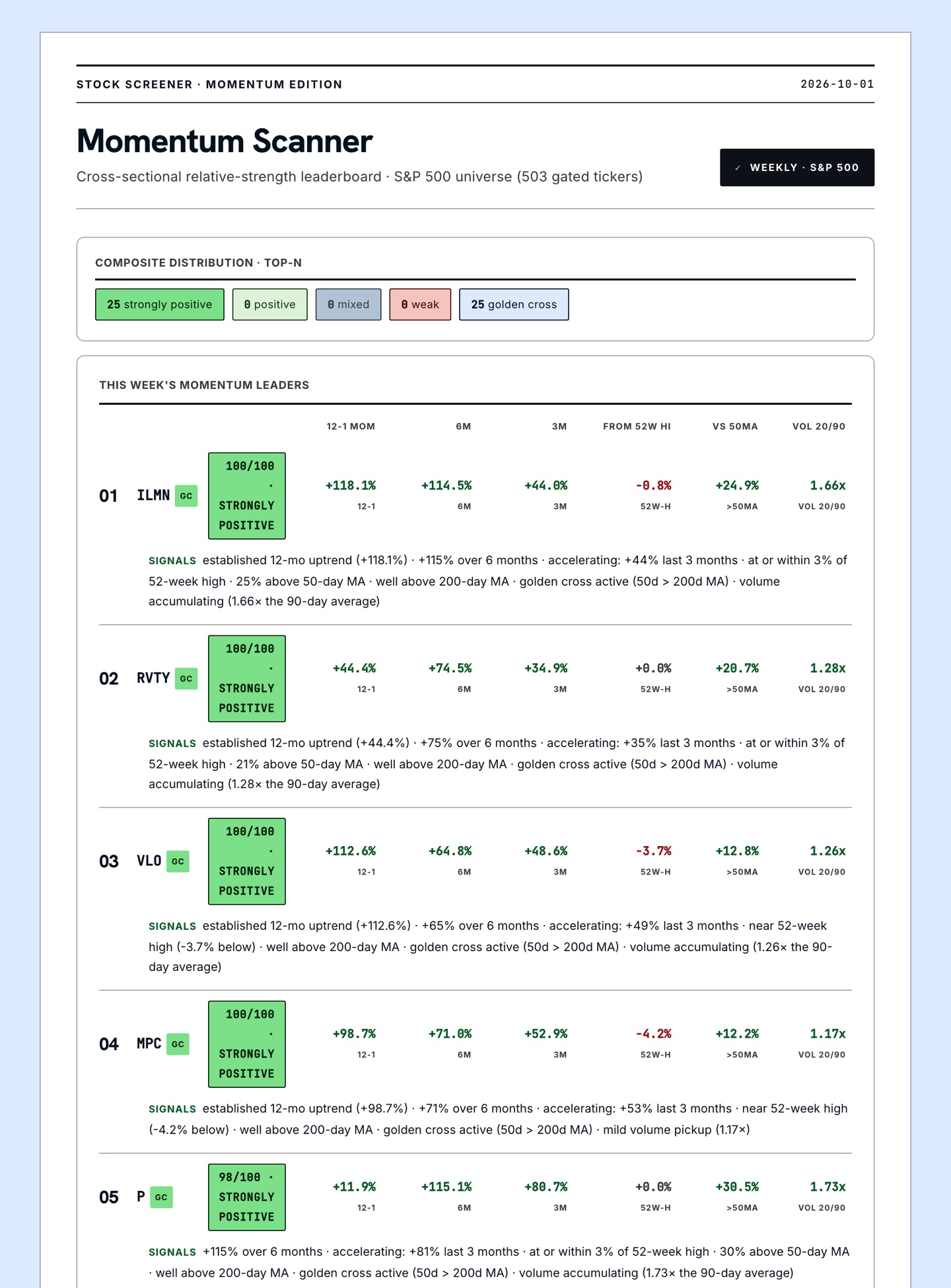
  • Momentum. The S&P 500 ranked on several trend measures at once, so no single number dominates.

What lands in your inbox

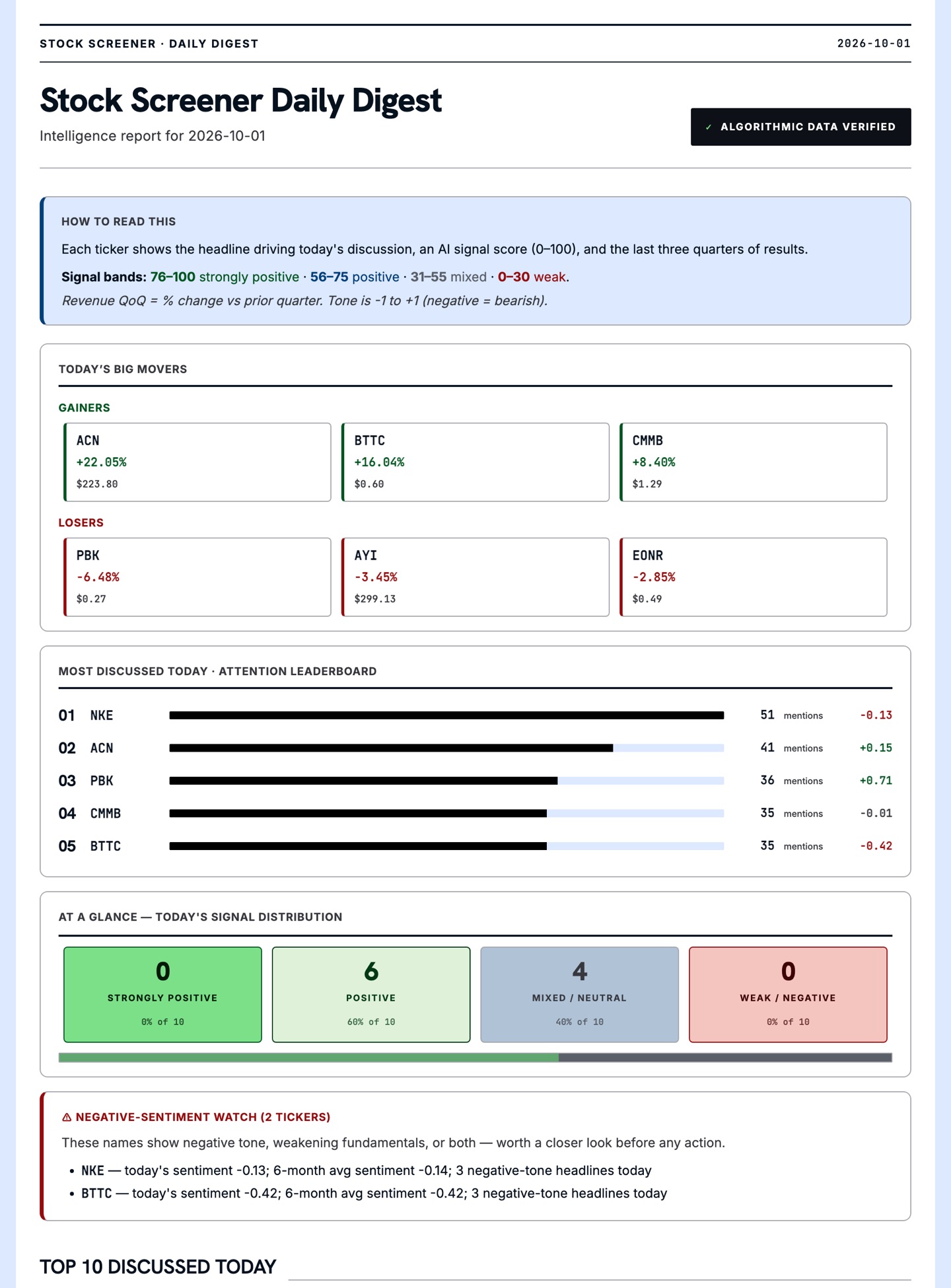
The Daily digest email for October 1, 2026: a how-to-read guide, the day's biggest gainers and losers, an attention leaderboard of the most discussed tickers, and how many names scored positive or negative.
Daily digest
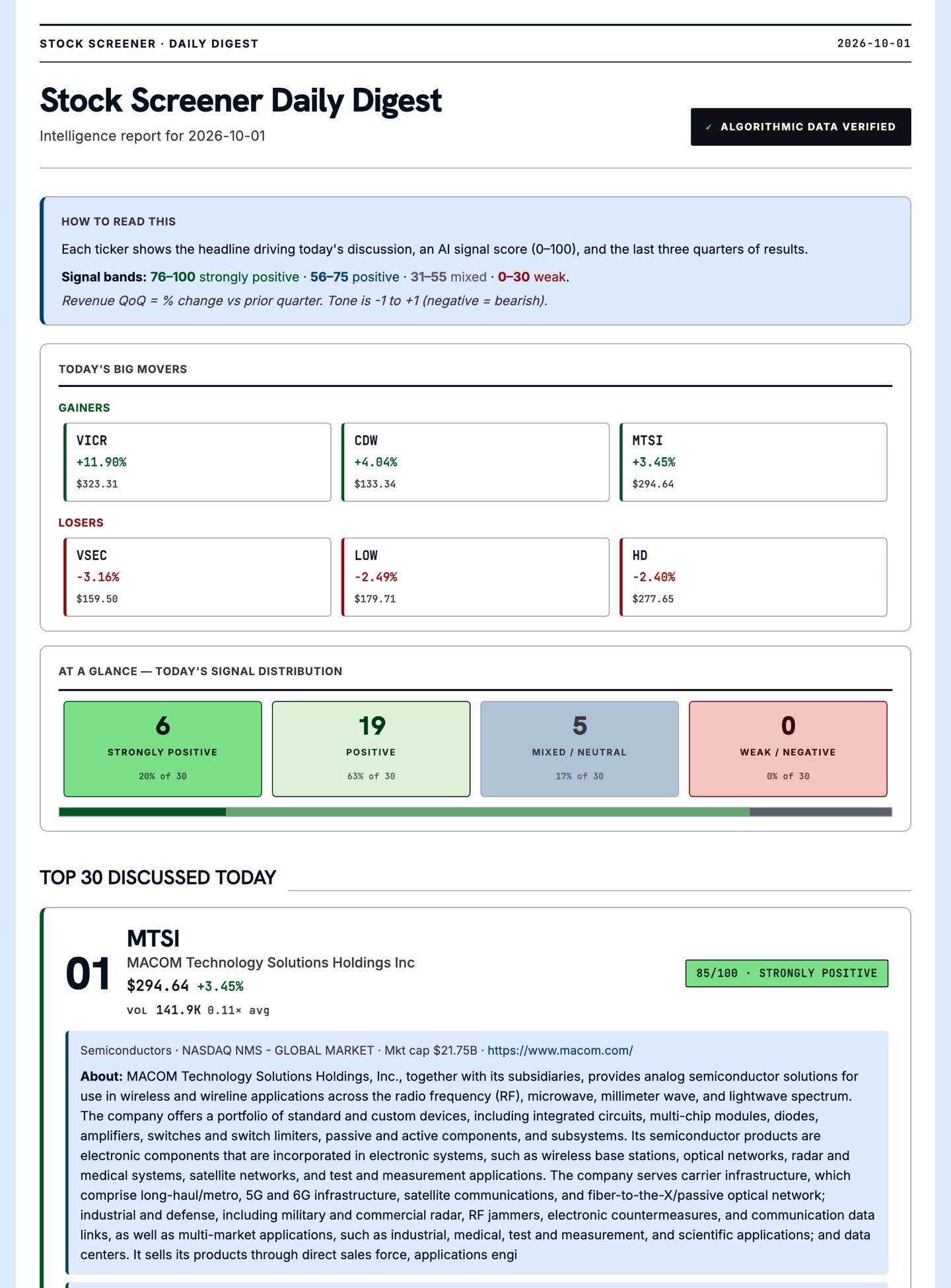
The Accelerating revenue email for October 1, 2026: the day's big movers, a signal distribution across 30 names, and the top-ranked company with its score of 85 out of 100.
Accelerating revenue
The Momentum email for October 1, 2026: a leaderboard of the strongest S&P 500 trends, with 12-1, 6 and 3 month returns, distance from the 52-week high and volume trend for each name.
Momentum

Real emails from October 1, 2026. Select one to see it in full.

Subscribe free at stock.rpsarathy.com

Confirmation link first, and one-click unsubscribe in every email. Mechanical screens and AI summaries, not financial advice.

Quant Model

Quant research and paper trading for US equities, built to be honest about what works.

It pulls daily prices for the S&P 500, backtests simple factor strategies net of trading costs, checks them out of sample, and runs the one that holds up against an Alpaca paper account every trading day. Paper money only: nothing trades real capital until the live record passes a 60-day acceptance bar.

Every idea gets a written go or no-go, and most of them have been no-go. That's the point of the process.

  • No lookahead, enforced in one place. The engine shifts every strategy's weights by a day, and a test with a perfect-foresight strategy has to fail.
  • Walk-forward validation. Rolling train and test windows are stitched into one out-of-sample record, so an overfit idea shows up as a collapsed test Sharpe.
  • One code path from research to trading. The daily paper loop uses the same data and strategy code as the backtests, then reconciles every fill against the intended book.
  • Guardrails in code: a paper-account check, a kill switch, position and notional limits, and a market-open check.
  • Monitoring: drawdown, drift and tracking error against the backtest, with Slack, webhook and email alerts and an end-of-day report.
  • Python, pandas, DuckDB and Parquet, with 265 tests in pytest.

Writing

Notes from running AI in production.

Read more on the blog